Invoicing · QR codes · PDF tools
Send your first invoice in under 2 minutes
No account needed to try it. Keep going with QR codes you can repoint after printing and PDF tools that just work, all under one login instead of three.
Takes a couple of minutes, no login required to try it. Free account adds 3 invoices a month, saved clients, and more.
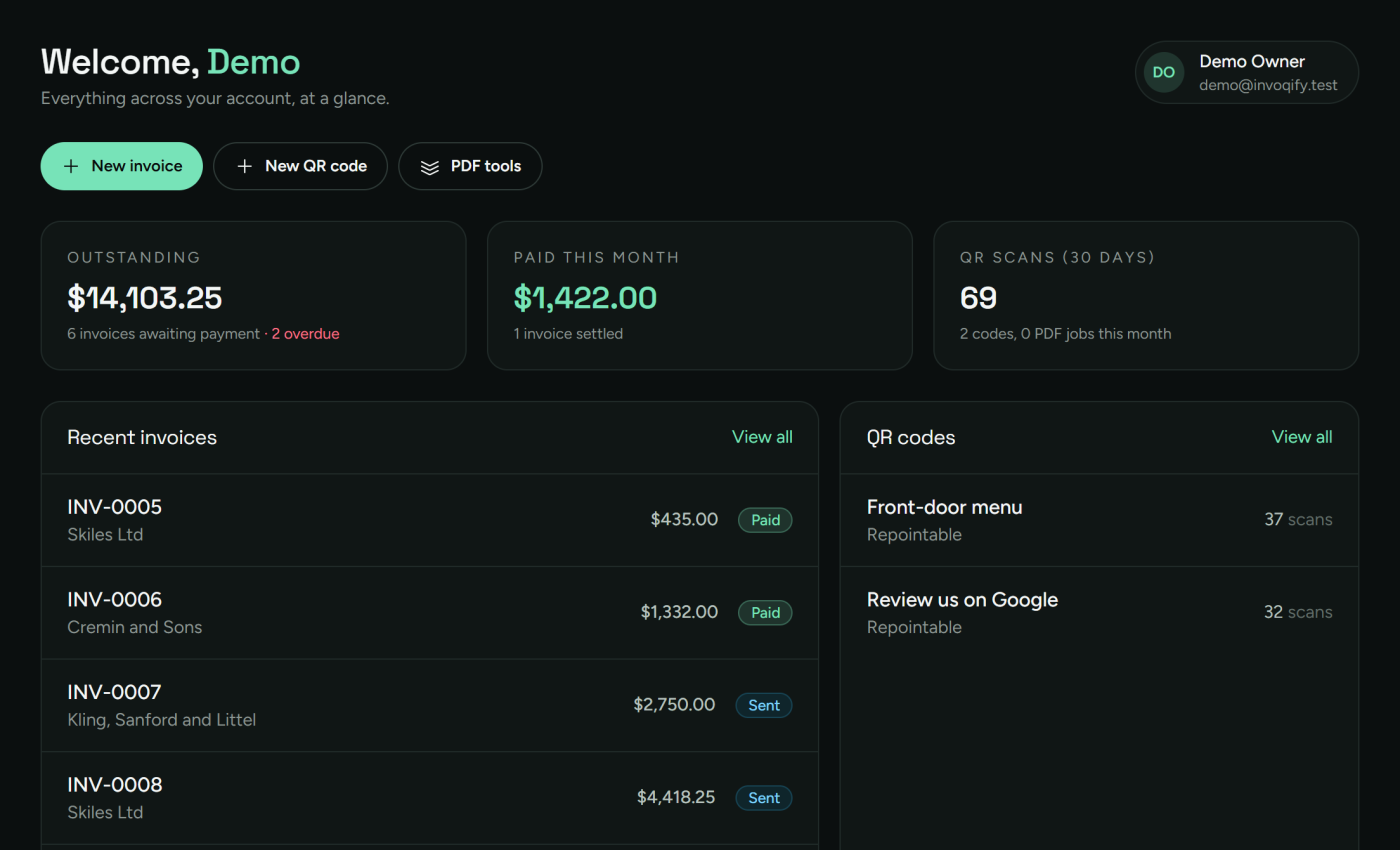
One account instead of three subscriptions
Three modules, one login, one bill. Not three tabs, three passwords, and three renewal dates.
Module 1
Invoicing
Line items, tax, and status tracking. Export a branded PDF. Set an invoice to repeat for clients you bill every month.
No account needed for your first one
Module 2
QR codes
Make a code once and change where it points later, without reprinting. Every scan is logged so you can see what people use.
No account needed for your first one
Module 3
PDF tools
Merge, split, rotate, turn images into a PDF, add a watermark, or sign a page. Jobs run in the background so your browser never hangs.
No account needed for your first one
PDF tools
Every PDF fix in one place
Pick a tool and go. The first one's free, no account needed.
Merge PDFs
Combine several PDFs into one, in the order you pick.
Extract pages
Pull a page range out into its own PDF.
Delete pages
Drop pages you don't want and keep the rest.
Rotate pages
Turn pages 90, 180, or 270 degrees.
Add page numbers
Stamp "1 / 10" page numbers along the bottom.
Images to PDF
Put JPGs or PNGs into one PDF, one per page.
Word to PDF
Turn a .docx file into a PDF.
Compress PDF
Shrink a scanned or image-heavy PDF that's grown too large to email.
Add watermark
Stamp text diagonally across every page.
Sign
Draw a signature and drop it on a page.
Split to single pages
Explode a PDF into one file per page (zip).
PDF to images
Turn every page into a JPG (zip).
Reorder pages
Drag pages into a new order.
Crop pages
Trim the margins off every page.
Excel to PDF
Turn an .xlsx spreadsheet into a PDF.
PowerPoint to PDF
Turn a .pptx slideshow into a PDF.
HTML to PDF
Turn an .html file into a PDF.
Repair PDF
Rebuild a PDF that other tools refuse to open.
Remove password
Remove a password you already know from a PDF.
Add password
Add a password so only people who have it can open the PDF.
Compare PDFs
Line two PDFs up side by side, page by page.
INV-0011
Smitham-Sauer
INV-0009
Strosin & Spencer
INV-0006
Pouros and Sons
Invoicing
Built to get you paid
Draft, send, and track every invoice from one list. The figures are locked in when you send, so an old invoice never shifts when you change a tax rate later.
- Line-item editor with live totals and tax
- Draft → sent → paid → overdue, tracked automatically
- Branded PDF export, your name not ours
- Recurring invoices on the Pro plan
What you get on day one
3
Modules
1
Login
$0
To start
2 min
To first invoice
Less tab-switching
Your paperwork in one place
The stuff around getting paid (a code on the invoice, a signed contract, a few scans merged into one PDF) usually lives in three different apps. Here it is one.
- One account, one bill, one password
- A scan-to-pay QR code on Pro invoices
- Saved clients you fill in once
- Your data exports whenever you want it
Invoicing
One account
QR codes
One account
PDF tools
One account
Clients
One account
Pricing
Flat pricing. No per-invoice fee.
Prices shown are monthly. Pay annually instead and save 10%, picked on the billing page after you sign up.
Free
$0/mo
Enough to try it. No card.
- +3 invoices a month, with PDF export
- +3 PDF jobs a day
- +5 static QR codes a month
- +1 repointable QR code, kept for life
- +30 days of scan history
Solo
$3.50/mo
For invoicing every week without thinking about it.
- +Unlimited invoices
- +Saved clients
- +Unlimited PDF jobs
- +Unlimited QR codes, static and repointable, no repoint cap
- +Full scan history
- +Your name on the invoice, not ours
Pro
$7/mo
For teams, and anyone billing the same clients on a schedule.
- +Everything in Solo
- +Recurring invoices
- +A scan-to-pay QR code on each invoice
- +PDF jobs run ahead of the queue
Questions people ask
What is Invoqify?
Invoqify is web-based invoicing software. One account also gives you QR codes you can repoint after printing and a set of PDF tools, so you are not paying for and logging into three separate apps.
How much does Invoqify cost?
The Free plan costs $0 and needs no card: 3 invoices a month, 5 static QR codes a month, and 1 repointable QR code kept for life. Solo is $3.5 a month for unlimited invoices, saved clients, and unlimited QR codes with no repoint cap. Pro is $7 a month and adds a team, recurring invoices, and a scan-to-pay QR code on every invoice.
Is there a free plan?
Yes. The Free plan is permanent, not a trial, and does not ask for a card. It is capped at 3 invoices per month, 3 PDF jobs per day, 5 static QR codes a month, and 1 repointable QR code kept for life (up to 5 repoints a month, with 30 days of scan history).
Can I send a PDF invoice?
Every invoice exports to a PDF you can download or email. It shows PAID or UNPAID, your "from" details, and how to pay you. On a paid plan the PDF carries your name and logo instead of ours.
What makes an Invoqify QR code "dynamic"?
A dynamic code prints a short link that never changes. You edit where that link points whenever you want, so a code on a printed flyer or invoice can be redirected without reprinting anything. Every scan is logged with a hashed IP, country, and device type. The Free plan keeps one dynamic code for life, with up to 5 repoints a month; paid plans remove both caps.
Which PDF tools are included?
Merge PDFs, Extract pages, Delete pages, Rotate pages, Add page numbers, Images to PDF, Word to PDF, Compress PDF, Add watermark, Sign, Split to single pages, PDF to images, Reorder pages, Crop pages, Excel to PDF, PowerPoint to PDF, HTML to PDF, Repair PDF, Remove password, Add password, and Compare PDFs.
Does Invoqify handle recurring invoices?
Recurring invoices are on the Pro plan. Set an invoice to repeat weekly, monthly, or yearly and Invoqify raises the next one on schedule.
Can I cancel any time?
Yes. Billing runs through Lemon Squeezy. If you cancel, your plan stays active until the end of the period you already paid for, then drops to Free.
Send your first invoice today
No account needed to start. Build one now; sign up when you want to send more.